
BrowserAgent AI – The AI Browser Agent That Actually Does The Work For You
Stop Getting Advice. Start Getting Results.

Most AI tools can write content, generate ideas, or create plans.
That’s useful. But let’s be honest.
A plan is not the same thing as a completed task.
You still have to open websites, search for information, copy data, fill forms, publish content, monitor competitors, collect leads, and handle dozens of repetitive online tasks yourself.
That’s where BrowserAgent changes the game.
BrowserAgent is an AI browser agent that can operate a real web browser, navigate websites, click buttons, type information, collect data, fill forms, conduct research, publish content, and complete online workflows automatically.
Instead of simply telling you what to do, BrowserAgent actually does it.
What Is BrowserAgent?
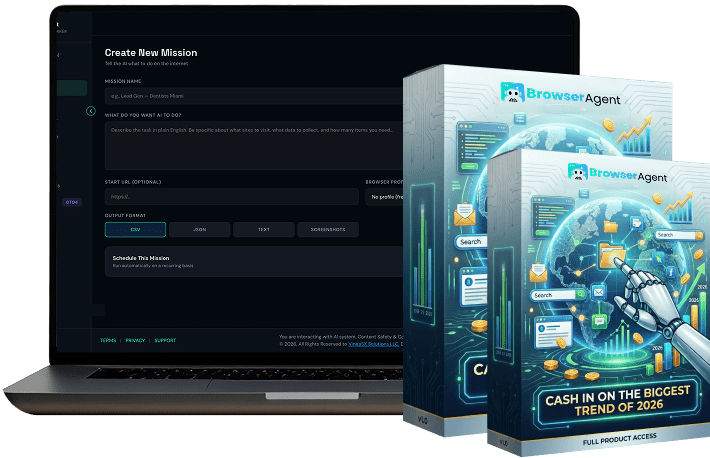
BrowserAgent is a cloud-based AI browser automation platform designed to perform real online tasks on your behalf.
Think of it as a virtual assistant that never sleeps.
Unlike traditional AI chatbots that provide suggestions or instructions, BrowserAgent interacts with websites much like a human user would. It can browse pages, scroll through content, click links, enter information, gather data, monitor websites, and complete workflows from start to finish.
In simple terms, BrowserAgent bridges the gap between AI-generated advice and real-world execution.
You tell it what you want.
It gets the work done.
Example Tasks BrowserAgent Can Complete
- Find local business leads
- Research competitors
- Generate SEO reports
- Monitor online reviews
- Publish social media content
- Collect market intelligence
- Create affiliate research reports
- Fill repetitive online forms
- Track product prices
- Build prospect databases
- Monitor industry trends
- Schedule recurring research tasks
For freelancers, agencies, marketers, business owners, affiliate marketers, and consultants, this can save countless hours every month.
How BrowserAgent Works
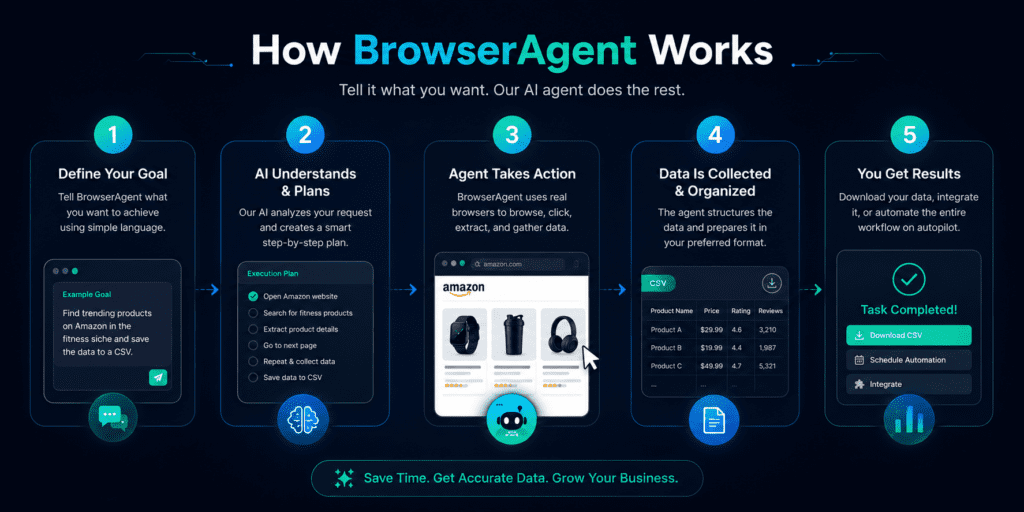
One of the biggest reasons people struggle with automation is complexity.
Many automation tools require technical skills, integrations, coding knowledge, API configuration, and extensive setup.
BrowserAgent takes a different approach.
Step 1: Describe The Task
Simply tell BrowserAgent what you want in plain English.
For example:
- Find 100 HVAC companies in Texas
- Research the top competitors in my industry
- Build a local SEO audit report
- Track pricing changes on competitor websites
No coding.
No workflows.
No complicated automation builders.
Step 2: BrowserAgent Opens A Real Browser
BrowserAgent launches a real browser environment in the cloud.
The AI then analyzes the page, navigates websites, clicks buttons, fills forms, gathers information, and performs actions exactly like a human user would.
Step 3: The AI Completes The Work
As BrowserAgent progresses through the task, it adapts to website layouts, navigates dynamic pages, and continues working until the objective is complete.
This includes handling:
- Dynamic websites
- JavaScript-heavy pages
- Multiple tabs
- Login sessions
- Data collection workflows
- Multi-step browser tasks
Step 4: Receive The Results
The final output is delivered in a structured format.
Depending on the task, that could include:
- Reports
- Lead lists
- Research documents
- Spreadsheets
- Content drafts
- Business intelligence data
The result is ready to use immediately.
BrowserAgent Features
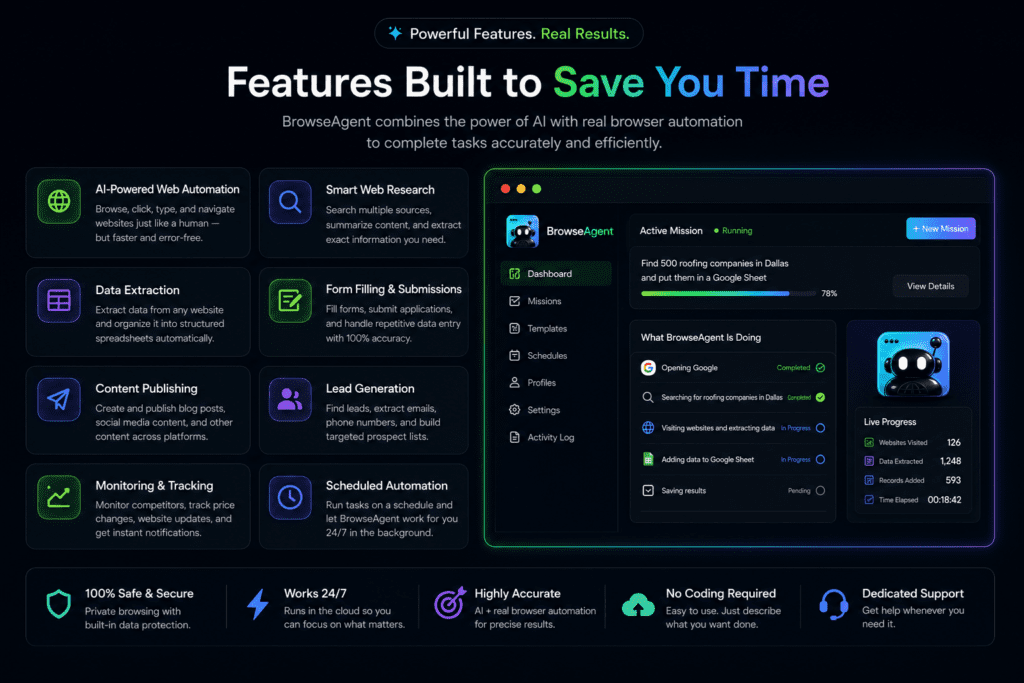
BrowserAgent includes a wide range of automation capabilities designed for business users, marketers, agencies, freelancers, and entrepreneurs.
Real Browser Automation
BrowserAgent operates inside a genuine browser environment.
This matters because many automation tools fail when they encounter dynamic websites, interactive elements, or changing layouts.
BrowserAgent can understand the page visually and take actions accordingly.
Plain-English Commands
The biggest mistake people make is assuming automation requires technical expertise.
BrowserAgent removes that barrier.
Simply explain what you want, and the AI handles the execution.
No coding required.
Cloud-Based Execution
Everything runs in the cloud.
You can launch a task and walk away.
Your computer does not need to remain active while BrowserAgent works.
Live Browser Monitoring
Here’s what most people don’t know.
Seeing automation happen in real time creates confidence.
BrowserAgent allows users to watch tasks as they occur, providing transparency throughout the process.
Automated Scheduling
Many online tasks are repetitive.
Lead generation.
Market research.
Price tracking.
Competitor monitoring.
BrowserAgent can schedule recurring tasks automatically, allowing you to collect fresh data on a daily, weekly, or hourly basis.
Data Export Options
Results can be exported into:
- CSV files
- Excel spreadsheets
- Google Sheets
This makes it easy to use collected data within existing business workflows.
Commercial Rights Included
One of the most attractive aspects of BrowserAgent is the ability to use generated outputs for client work.
Lead reports, research documents, competitor analysis, audits, and other deliverables can be used as part of commercial services.
BrowserAgent Use Cases
Different users will benefit from BrowserAgent in different ways.
Let’s look at some practical applications.
Lead Generation
Finding qualified leads can be time-consuming.
BrowserAgent can gather business information from directories, search engines, review platforms, and public sources.
Instead of manually collecting hundreds of records, users can automate the process.
Local SEO Audits
Local marketing agencies often spend hours preparing SEO audits.
BrowserAgent can collect business listings, review data, citation information, competitor insights, and market intelligence much faster.
Competitor Research
Understanding competitors is critical.
BrowserAgent can track:
- Pricing
- Reviews
- Product changes
- Social activity
- Market positioning
This information can help businesses make better strategic decisions.
Social Media Support
Managing multiple social platforms can become overwhelming.
BrowserAgent can assist with publishing workflows, content research, scheduling activities, and monitoring online presence.
Affiliate Marketing
Affiliate marketers can use BrowserAgent to collect product information, competitor data, market trends, and keyword opportunities.
Research that once required several hours can often be completed much faster.
Business Intelligence
Every business relies on data.
BrowserAgent helps collect and organize information that supports smarter decisions.
Why BrowserAgent Stands Out
The AI software market is crowded.
New tools appear every week.
Many promise automation.
Few actually execute real browser tasks effectively.
BrowserAgent focuses on execution rather than conversation.
Think of most AI platforms as consultants.
They tell you what to do.
BrowserAgent behaves more like an employee.
You assign work.
The work gets completed.
That distinction may seem small.
In reality, it changes everything.
Because businesses generate revenue from completed tasks, not suggestions.
Who Should Use BrowserAgent?
BrowserAgent is well suited for:
Marketing Agencies
Automate lead generation, audits, reporting, competitor analysis, and client research.
Freelancers
Reduce repetitive work and focus on higher-value activities.
Business Owners
Automate data collection, monitoring, and operational tasks.
Affiliate Marketers
Accelerate research and content preparation workflows.
Consultants
Deliver reports and market intelligence more efficiently.
Entrepreneurs
Scale processes without hiring additional staff.
BrowserAgent Benefits At A Glance
| Benefit | Description |
|---|---|
| Time Savings | Automates repetitive browser tasks |
| Increased Productivity | Complete more work in less time |
| Cloud Execution | Tasks run independently |
| No Coding Required | Designed for non-technical users |
| Commercial Rights | Use outputs for client services |
| Real Browser Control | Handles complex websites |
| Scheduling | Automates recurring workflows |
| Data Export | Easily share and organize results |
Simple Pricing. Serious Automation.
Choose the plan that fits your goals and let BrowserAgent do the work for you.
BrowserAgent Premium — $37
Everything you need to automate research, lead generation, data collection, form filling, content publishing, and more.
✓ WebPilot AI Browser Engine
✓ 50+ Done-For-You Missions
✓ 3 Workers + Unlimited Missions
✓ 12 Months Cloud Hosting
✓ Commercial Rights
✓ Full Training + 24/7 Support
✓ Bonus Vault Included ($4,000+ Value)
BrowserAgent Bundle — $317
For agencies, consultants, and power users who want maximum automation.
✓ Everything In Premium
✓ 100+ Mission Library
✓ White-Label Dashboard
✓ 25 Client Accounts
✓ Workflow Chain Builder
✓ 10 Workers Running 24/7
✓ Full API Access
✓ Agency & Commercial License
Use Coupon Code: BROWSER For $50 OFF
14-Day Money-Back Guarantee
Try BrowserAgent for yourself.
Launch real missions. Watch it control a live browser. See real work get completed automatically.
If you’re not satisfied for any reason, simply request a refund within 14 days.
No risk. No hassle.
One Honest Word Before You Decide
Don’t take our word for it.
Get inside. Run a mission. Watch BrowserAgent work.
Then decide.
Final Thoughts
AI is evolving rapidly.
The next phase isn’t simply generating information.
It’s taking action.
BrowserAgent represents that shift.
Instead of producing another report that sits unread in your inbox, it helps complete real work that moves projects forward.
Whether you’re collecting leads, researching competitors, building reports, monitoring markets, or automating repetitive workflows, BrowserAgent gives you a practical way to reduce manual effort and increase productivity.
For professionals who spend hours every week inside a browser performing repetitive tasks, BrowserAgent offers a compelling alternative.
Less clicking.
Less busywork.
More completed work.
Frequently Asked Questions
What is BrowserAgent?
BrowserAgent is an AI-powered browser automation platform that can perform tasks on websites by navigating, clicking, typing, researching, collecting information, and completing workflows automatically.
Does BrowserAgent require coding?
No.
BrowserAgent is designed for users without technical experience. Tasks can be created using plain-English instructions.
Can BrowserAgent run in the background?
Yes.
BrowserAgent operates in the cloud, allowing tasks to continue running independently.
What types of tasks can BrowserAgent automate?
Lead generation, competitor research, SEO audits, market analysis, content workflows, form submissions, data collection, monitoring, and more.
Can businesses use BrowserAgent commercially?
Yes.
Commercial rights are included, allowing users to utilize outputs within client projects and business services.
Does BrowserAgent support scheduled tasks?
Yes.
Recurring tasks can be scheduled on daily, weekly, or hourly intervals.